- A. Introducing AI Agents
- B. Building AI Agents with LangGraph
- C. Runtime Advantages
- D. Payload Structure
- E. Multi-modal support
- F. Context object
- G. Custom headers
- H. Deployment pattern
- I. Container requirements
- J. Session management
- K. Testing locally
A. Introducing AI Agents
Sometimes people overcomplicate this stuff, so let’s keep it simple.
What’s AI agents?
AI agents are systems that:
-
(1) think through problems step-by-step,
-
(2) connect to external tools when needed and,
-
(3) learn from their actions to improve over time.
Unlike traditional chatbots that primarily generate responses based on user prompts, agents are designed to act autonomously by planning, executing, and iterating on tasks to achieve a defined goal.
For example, instead of simply describing a dataset when asked, an agent can retrieve the relevant data, perform analysis, generate insights, and even trigger follow-up actions—such as updating a system or producing a report—without continuous user guidance.
Unlike traditional models that handle isolated tasks, an agent coordinates multiple capabilities while maintaining a coherent understanding of the overall objective.
Rather than simply following predefined instructions, agents can adapt and make informed decisions about the next steps based on insights gathered throughout the process, operating in a way that more closely resembles human problem-solving.
- ✅ Framework agnostic: Works with deployed agents from multiple frameworks (Strands, LangGraph, CrewAI, custom MCP)
B. Building AI Agents with LangGraph
Now that you understand what AI agents are and why they matter, let’s build one using AgentCore runtime — a powerful agnostic framework for building robust AI agents.
What I particularly appreciate about the Amazon Bedrock AgentCore is its ability to make an agent’s reasoning process explicit and traceable. Moreover, regardless of the open-source framework used, it standardizes deployment so that all agents can be deployed and operated in a consistent manner.
B.1 How it works
There are 4 mains steps to achieve:
- ✅ Import
BedrockAgentCoreApp - ✅ Create your agent (any framework)
- ✅ Define
@app.entrypoint - ✅ Deploy with agentcore CLI
B.2 The entrypoint pattern
Key Points:
- Same signature for ALL frameworks
- Payload = user input (100MB max)
- Context = session metadata
- Return dict serialized to JSON
🚀 AgentCore Runtime - A serverless deployment model is provided to host and scale AI agents efficiently, eliminating the need for infrastructure management while ensuring automatic scalability and operational flexibility.
-
Same signature for ALL frameworks
-
Payload = user input (100MB max)
-
Context = session metadata
-
Return dict serialized to JSON
@app.entrypoint
def agent_invocation(payload, context):
    # Receives:
    # - payload: dict with user input
    # - context: RequestContext with headers, sessionid

    # Must return
    # - dict with result

    return {"result": "Hello World"}
B.3 Examples
- Strands Agents example:
from strands import Agent
from bedrock_agentcore.runtime import BedrockAgentCoreApp

agent = Agent(tools=[file_read, file_write])  # Simple Agent with tool use
app = BedrockAgentCoreApp(__name__)

@app.entrypoint
def agent_invocation(payload, context):
    user_message = payload.get("prompt", "")
    result = agent(user_message, context)     # Context is not mandatory

    return {"result": result.message}
- LanGraph Agents example:
from  langgraph.graph import StateGraph
from bedrock_agentcore.runtime import BedrockAgentCoreApp

app = BedrockAgentCoreApp()

# Build your graph
graph_builder = StateGraph(State)
graph_builder.add_node("agent", call_node)
graph = graph_builder.compile()

@app.entrypoint
def agent_invocation(payload, context):
    message = [{"role": "text", "context": payload.get("prompt", "")}]
    result = graph.invoke({"message": message})
    return {"result"; result["message"][-1].content}
- CrewAI Agents example:
from crewai import Agent, Crew, Task
from bedrock_agentcore.runtime import BedrockAgentCoreApp

app = BedrockAgentCoreApp()

# Define agent and crew
researcher = Agent(
    role="Research",
    goal="Analyze market trends and provide insights",
    backstory="Expert in market research with deep analytical skills")

Writer = Agent(
    role="Writer",
    goal="Create engaging content based on research",
    backstory="Skilled writer with experience in technical content")

crew = Crew(agents=[researcher, Writer], tasks=[task1, task2], verbose=2)

@app.entrypoint
def agent_invocation(payload, context):
    result = crew.kickoff(inputs={"topic": payload.get("prompt", "")})
    return {"result": result}
- Custom Framework example:
from bedrock_agentcore.runtime import BedrockAgentCoreApp
import anthropic

app = BedrockAgentCoreApp()
client = anthropic.Anthropic

@app.entrypoint
def agent_invocation(payload, context):
    # Custom logic - no framework needs
    message = payload.get("prompt", "")

    # Build your own Agent logic
    response = client.messages.create(
        model="claude-3-haiku-20240307",
        max_tokens=1000,
        messages=[
            {"role": "user", "content": message}
        ]
    )
    return {"result": response.content[0].text}
C. Runtime Advantages
C.1 Purpose-built for Agents
- 🔒 MicroVM Isolation - Each session separate
- ⚡ Fast Cold Starts - Sub-second initialization
- ⏱️ 8-Hour Runtime - Long-running agents supported
- 📦 100MB Payloads - Multi-modal content
- 🔐 Session Isolation - CPU, memory, filesystem separated
C.2 Lambda vs. AgentCore Runtime
- ❌ Lambda: 15 min max, 6MB payload
- ✅ Runtime: 8 hour max, 100MB payload
D. Payload Structure
In Amazon Bedrock, the structure of the payload (maximum size 100 MB) depends on the API you are using (e.g., InvokeModel, InvokeAgent, or Converse). However, there is a common pattern: a JSON body that contains the
- input,
- optional configuration, and
- sometimes context or session data.
{
  "prompt": "User's question or instruction",
  "context": {...},   # Optional
  "parameters": {...} # Optional
}
E. Multi-modal support
AgentCore runtime support many input type(up to 100MB).
- 📝 Text (prompts, documents, PDFs- )
- 🖼️ Images (PNG, JPEG, WebP)
- 🎵 Audio files
- 🎥 Video content
- 📊 Large datasets
F. Context object
The context object represents metadata about the request and execution environment, rather than the user’s input itself.
While the exact structure can vary slightly depending on the runtime or framework, it typically follows a pattern like this:
{
  "request_id": "string",
  "session_id": "string",
  "identity": {
    "principal": "user/role",
    "auth_type": "OAuth | API_KEY | IAM",
    "token": "..."
  },
  "headers": {
    "key": "value"
  },
  "memory": {
    "session_attributes": {...},
    "long_term_reference": "..."
  },
  "tools": {
    "available": ["tool1", "tool2"]
  },
  "runtime": {
    "region": "us-east-1",
    "timestamp": "ISO8601"
  }
}
Use cases
- 🔐 Access Authorization headers (OAuth)
- 📊 Track sessions for analytics
- 🏷️ Tag resources with session_id
- 🔗 Pass custom metadata
G. Custom headers
In Amazon Bedrock / AgentCore runtime, custom headers are not strictly standardized as a fixed schema—they are typically passed through the context object as a key-value map of HTTP headers coming from the client or upstream service.
Amazon Bedrock AgentCore Runtime lets you pass headers in a request to your agent code provided the headers match the following criteria:
-
Header name is one of the following:
- Starts with
X-Amzn-Bedrock-AgentCore-Runtime-Custom- - Equal to
Authorization. This is reserved for agents withOAuth inboundaccess to pass in the incoming JWT token to the agent code.
- Starts with
-
Header value is not greater than 4KB in size.
-
Up to 20 headers can be configured per runtime.
Use cases:
- 🔐 Pass OAuth tokens
- 📊 Custom tracking IDs
- 🏷️ Tenant identifiers
- 🔗 Feature flags
A practical request flow looks like this:
Frontend / App
   |
   |  POST InvokeAgentRuntime
   |  Headers:
   |   Authorization: Bearer <jwt>
   |   X-Amzn-Bedrock-AgentCore-Runtime-Custom-UserId: user-123
   |   X-Amzn-Bedrock-AgentCore-Runtime-Custom-Tenant: acme
   |   X-Amzn-Trace-Id: ...
   |
   v
AgentCore Runtime
   |
   |  checks runtime requestHeaderAllowlist
   |  forwards only allowed headers
   v
Your agent entrypoint
   |
   |  payload -> user input
   |  context.request_headers -> forwarded headers
   v
Agent logic / tools / memory / outbound calls
Two steps to configure custom headers:
1- Configure Allowed Headers(here we’re are using AWS CLI)
agentcore configure \
    --request-header-allowlist  # -rha for short \
    # Comma-separated list of allowed request headers
    "X-Amzn-Bedrock-AgentCore-Runtime-Custom-H1"
2- Access in Agent
@app.entrypoint
def handler(payload, context):
  headers = context.request_headers
  custom_value = headers.get("X-Amzn-Bedrock-AgentCore-Runtime-Custom-H1")
H. Deployment pattern
1- Run configure, orchestrate docker creation in AWS
agentcore configure
  --entrypoint agent.py
  --name my-agent
  --execution-role <role-arn>
2- Launch container on AWS
agentcore launch # Builds, containerizes, deploys)
3- Invoke the model
agentcore invoke '{"prompt": "Hello!!"}'
I. Container requirements
Unlike traditional ML endpoints,
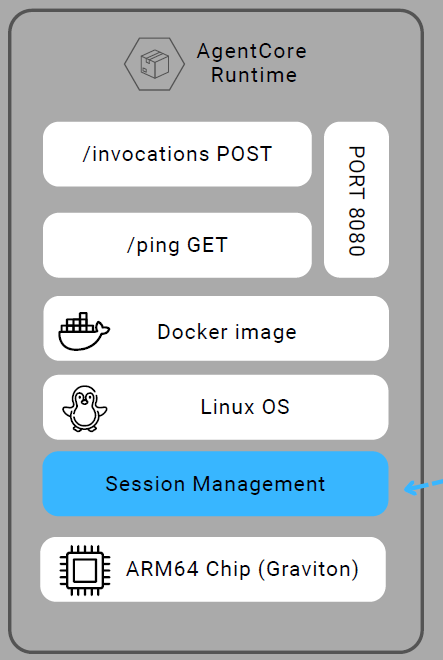
AgentCore Runtimedoes not require developers to expose /invocations routes, instead, it relies on a standardized entrypoint function, with the runtime handling request routing and execution transparently.
What Runtime Needs:
- 🔐 Port 8080 exposed
- 📊 /invocations POST endpoint
- 🏷️ /ping GET endpoint (health check)
- 🔗 ARM64 architecture (linux/arm64)
- 🔗 Image in AWS ECR
Therefore BedrockAgentCoreApp handles this automatically.
J. Session management
Session Isolation & Context
- 🔐 Isolated microVM
- 📊 Dedicated CPU, memory, filesystem
- 🏷️ Unique session_id
- 🔗 15-min idle timeout → 8-hour max
- 🔗 Accessible in context of Runtime payload
K. Testing locally
Benefits Run locally of testing locally
- 🔐 Test before deploying
- 📊 Fast iteration
- 🏷️ No AWS costs, (besides LLMs that you invoke)
- 🔗 Easy debugging
- 🔗 Matches production exactly
Run locally
agentcore run
Test with curl
curl -X POST http://localhosy:8080/invocations \
  -H 'Content-Type: application/json' \
  -d '{"prompt": "Hello!!"}'